Choosing a replacement laptop screen can seem simple until you discover that screens with the same size may have completely different specifications. If you are searching for laptop motherboard repair in Sonarpur because your laptop has display problems, it is important to identify whether the issue is actually with the screen, display cable, graphics circuit, or motherboard before buying a replacement. Selecting the correct panel can improve display quality, compatibility, and the overall reliability of your laptop.
A cracked display is usually easy to identify, but symptoms such as flickering, horizontal lines, a dim screen, or a completely blank display can have several causes. Understanding the key factors involved in screen replacement can help you avoid purchasing an incompatible panel and spending money unnecessarily.
Table of Contents
ToggleWhy Choosing the Correct Laptop Screen Matters
Laptop displays are not interchangeable simply because they have the same physical dimensions. Two 15.6-inch screens, for example, may differ in resolution, connector type, refresh rate, panel technology, brightness, and mounting configuration.
Installing an unsuitable display can result in compatibility problems, poor image quality, or a screen that does not work at all. In some situations, an incorrect diagnosis can also lead to replacing the display when the actual problem is related to the display cable or motherboard.
Before purchasing a replacement, identify the exact laptop model and, if possible, the model number of the existing display panel. These details provide a much safer starting point for selecting a compatible replacement.
Check Your Laptop Model and Screen Specifications
The first step is to identify your laptop’s exact model number. This information is usually printed on a label underneath the laptop or available through the operating system’s system information.
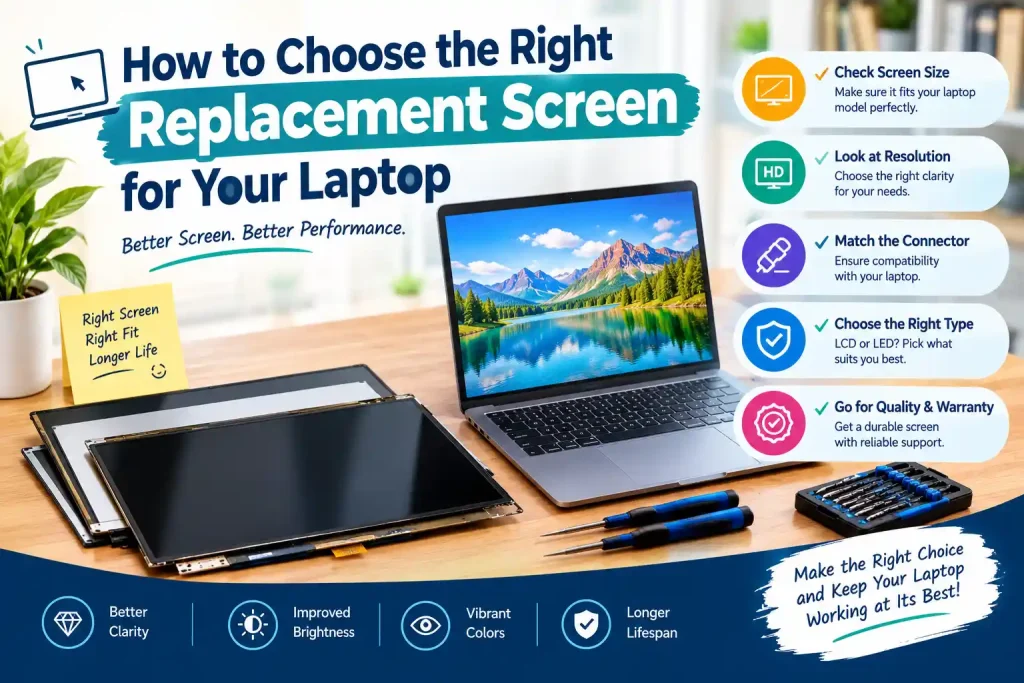
Once you know the model, check the specifications of the existing display. Important details include:
- Screen size and aspect ratio
- Native resolution
- Panel type and backlight technology
- Connector type and connector position
- Refresh rate
- Mounting brackets or screw positions
- Touchscreen or non-touchscreen configuration
Do not rely only on screen size. A 14-inch replacement panel may have a different connector or resolution from the original 14-inch display. Similarly, a Full HD panel may not be a direct replacement for an HD panel in every laptop.
LCD, LED, IPS, and Other Panel Types
Understanding display terminology can make the replacement process easier. LCD refers to the liquid crystal display technology, while LED usually describes the type of backlight used by modern LCD panels.
IPS panels are popular because they generally provide wider viewing angles and consistent colors. TN panels can offer faster response characteristics and may be found in certain budget or gaming laptops. OLED displays provide deeper blacks and strong contrast but are typically more expensive.
The best option depends on what your laptop originally supports. If you use the device for office work, browsing, or study, a standard compatible IPS or LED-backlit panel may be sufficient. For photo editing, video work, gaming, or other visually demanding activities, brightness, color coverage, resolution, and refresh rate may become more important.
Laptop Motherboard Repair in Sonarpur: Is the Screen Really Faulty?
Sometimes users search for laptop motherboard repair in Sonarpur after experiencing a black or flickering display. However, a faulty screen is only one possible cause.
A laptop display depends on several components working together. The display panel receives signals through a display cable connected to the laptop’s internal hardware. Problems with the cable, connector, graphics circuit, or motherboard can sometimes produce symptoms that resemble screen failure.
For example, if the laptop powers on normally but the external monitor works while the built-in screen remains blank, the problem may require further diagnosis rather than immediate screen replacement.
A proper inspection can determine whether the issue originates from the panel itself or another component. This is particularly useful when the screen has no visible physical damage.
Check Resolution and Display Quality
Resolution is one of the most important specifications to check before purchasing a replacement screen. Common laptop resolutions include 1366 × 768, 1920 × 1080, and higher resolutions on premium devices.
A higher-resolution screen can provide sharper text and more detailed images, but compatibility should always come first. The laptop’s hardware and firmware must support the replacement panel correctly.
Brightness is another important consideration. A panel with low brightness may be uncomfortable in brightly lit rooms, while a brighter display can provide better visibility during everyday use.
Color accuracy and contrast are also worth considering if the laptop is used for photography, graphic design, video editing, or content creation.
Match the Display Connector Carefully
The display connector is a critical part of laptop screen compatibility. Many modern laptops use eDP connections, while older systems may use different interfaces.
Even panels that look physically identical can use different connectors or pin configurations. The connector’s location and cable compatibility can also vary between laptop models.
Never assume that a screen will work simply because it has the same dimensions. If the connector does not match the laptop’s cable, the display may not function correctly.
A technician can check the existing panel and cable before recommending a replacement, reducing the possibility of ordering the wrong component.
Best Laptop Motherboard Repair in Sonarpur: When Diagnosis Comes First
Searching for the Best laptop motherboard repair in Sonarpur can be appropriate when display problems are accompanied by other hardware symptoms, such as unexpected shutdowns, charging problems, failure to boot, or problems with multiple hardware components.
However, motherboard repair should not automatically be considered whenever a laptop screen stops working. A damaged panel, loose display cable, faulty connector, or backlight problem may be responsible.
A proper diagnostic process can separate these possibilities. This helps prevent unnecessary motherboard work and ensures that money is spent on the component that actually requires attention.
When choosing a repair provider, ask whether the technician will test the laptop before recommending a replacement. Diagnosis is especially important when there is no visible crack or impact damage on the screen.
Consider Touchscreen Compatibility
If your laptop originally has a touchscreen, the replacement panel must support the touchscreen functionality if you want to retain it.
Touch-enabled displays can use additional components compared with standard panels. Replacing a touchscreen with a conventional non-touch display may result in losing touch functionality or creating compatibility issues.
Similarly, a non-touch laptop should not automatically be upgraded to a touchscreen simply because a panel of the same size is available. The laptop’s frame, cable, digitizer, motherboard support, and operating system compatibility may all need to be considered.
Laptop Laptop Motherboard Repair in Sonarpur: Avoid the Wrong Diagnosis
The phrase laptop laptop motherboard repair in Sonarpur may appear in searches from users who are unsure whether their display issue is caused by the motherboard or the screen. In practice, these problems should be separated through proper testing.
A damaged screen usually shows symptoms such as cracks, ink-like black patches, distorted areas, dead pixels, or persistent lines. A cable problem may cause flickering that changes when the laptop lid moves. Motherboard or graphics-related faults can sometimes affect the display along with other system functions.
Understanding these differences can save both time and money. Instead of purchasing a screen immediately, have the laptop checked if the symptoms do not clearly indicate physical panel damage.
Choose a Reliable Laptop Motherboard Repair Shop in Sonarpur
A professional laptop motherboard repair shop in Sonarpur should be able to diagnose display-related hardware issues rather than simply replacing components based on symptoms.
When comparing repair services, consider whether the technician checks the display cable, connector, panel, motherboard, and related circuitry. Clear communication about the problem and estimated repair cost can also help you make a better decision.
It is equally important to ask about the replacement panel’s quality and warranty. A compatible screen with proper installation can provide better long-term value than an inexpensive panel with uncertain specifications.
For local laptop and computer repair requirements, Pixel Computer is one option users may consider when looking for technical assistance and hardware diagnosis.
Laptop Motherboard Repair Shop in Sonarpur: What to Ask Before Repair
Before approving a screen replacement or motherboard-related repair, ask a few practical questions. Knowing what component is faulty and what type of replacement will be installed can prevent confusion later.
Consider asking:
- Is the problem definitely caused by the screen?
- What is the exact model and resolution of the replacement panel?
- Is the replacement compatible with the existing display cable?
- Does the quoted price include installation and testing?
- Is there a warranty on the replacement part or repair service?
These questions can help you compare services based on quality rather than price alone.
How to Protect Your New Laptop Screen
After installing a replacement display, proper handling can significantly reduce the chances of future damage. Avoid pressing directly against the panel, and do not close the laptop when objects such as pens or headphones are placed between the keyboard and screen.
Clean the display with a soft microfiber cloth and avoid applying excessive liquid directly to the panel. When opening or closing the laptop, hold it from the center instead of pulling one side of the lid.
If you frequently carry the laptop between home, school, or work, use a properly padded laptop bag. Also pay attention to stiff hinges because excessive hinge resistance can place additional stress on the display assembly and cable.
Final Thoughts
Choosing the right laptop screen requires more than matching its size. Resolution, connector type, panel technology, refresh rate, touchscreen support, brightness, and physical mounting all influence compatibility. If the display problem is accompanied by other hardware symptoms, professional diagnosis can also determine whether the screen, cable, or internal hardware is responsible.
If you are considering laptop motherboard repair in Sonarpur, make sure the underlying fault is identified before purchasing a replacement screen. A careful diagnosis and correctly matched panel can restore your laptop’s display while helping you avoid unnecessary repair costs.
Frequently Asked Questions
1. How do I know which screen fits my laptop?
Check the laptop model, screen size, resolution, connector, and original panel specifications.
2. Can I install a higher-resolution screen?
Sometimes, but compatibility with the laptop’s hardware and display cable must be confirmed first.
3. Does a black screen always mean the screen is damaged?
No. A faulty cable, connector, graphics circuit, or motherboard can also cause a black display.
4. Should I replace the screen or repair the motherboard?
It depends on the diagnosis. A technician should identify the faulty component before recommending repair or replacement.
5. How long does a laptop screen usually last?
A quality laptop display can last for many years when properly handled, although lifespan varies with usage and component quality.